
Permission Audit
Who can access this project, and how they got that access.
Jira will tell you that someone can administer a project. It will not tell you why. Permission Audit resolves the whole chain — account to group to project role to permission scheme grant — for every account on your site, and puts the derivation in a column you can hand to an auditor.
Permission Audit is in final release preparation. Ask to hear when it ships.
The problem
Native Jira cannot answer the question an access review asks.
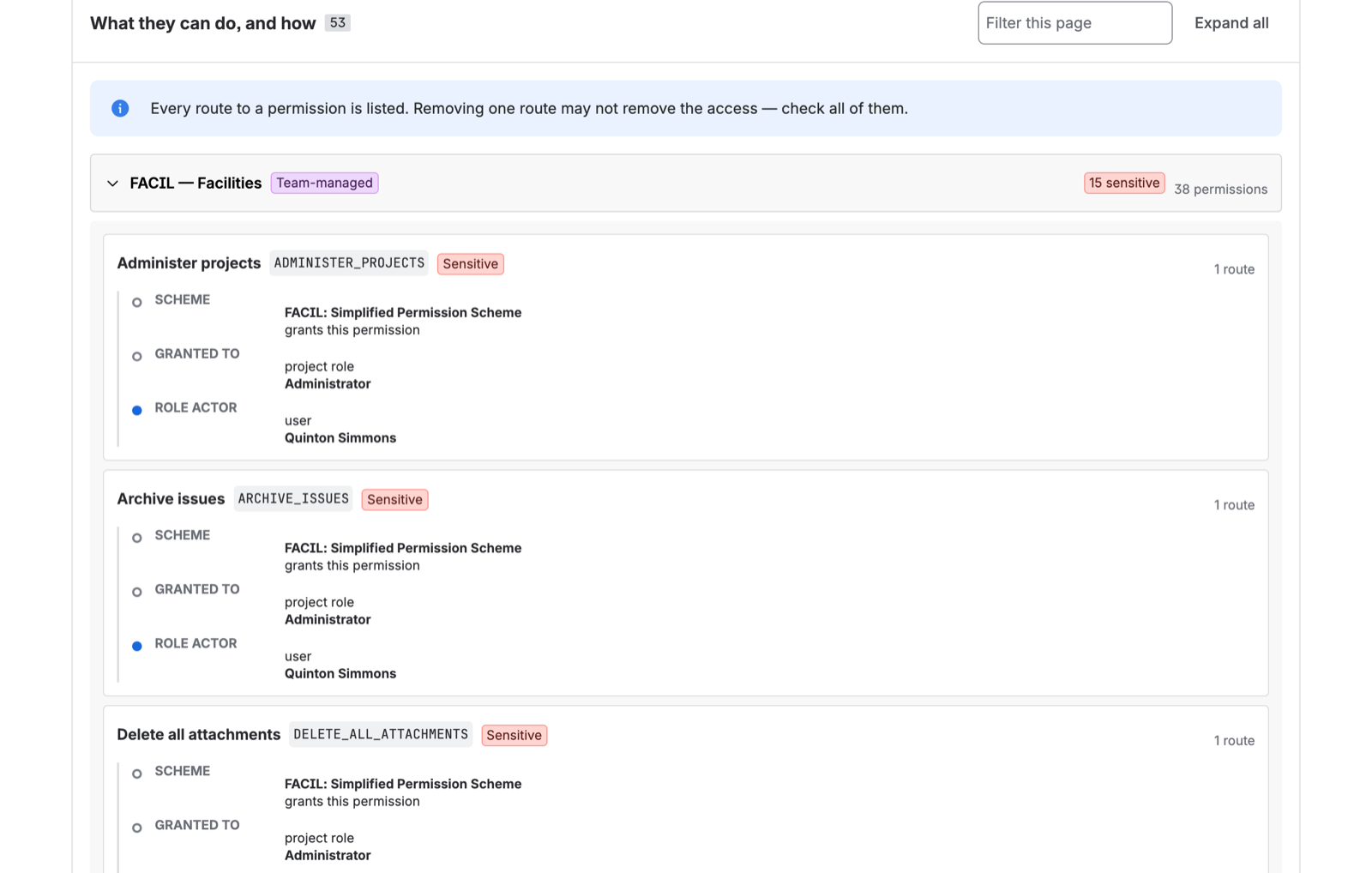
Effective permission in Jira resolves through a chain: an account belongs to a group, the group is an actor in a project role, the role is granted a permission by the project’s permission scheme. Change any link and the answer changes. Nothing in Jira reports that derivation.
So the review gets done by hand — a site admin clicking through permission schemes, exporting group membership, and reconciling them in a spreadsheet, once a quarter, for as many projects as the estate has.
Permission schemes list grants, not people
A scheme tells you that the Developers role holds Administer Projects. It does not tell you that fourteen named accounts are in that role through three different groups.
Nobody reports on accounts with no access
Which is the answer an offboarding check actually needs. A grant-driven export can never produce it — it only learns about accounts that appear in a grant.
Installed apps hold permissions too
Every Forge and Connect app on your site acts under a principal that holds real product permissions. Most sites have dozens and have never reviewed one of them.
A spreadsheet is stale the day it is finished
And it carries no record of what changed between reviews, so “when did this person get admin?” has no answer.
The derivation chain
The column no other tool renders.
For every grant, Permission Audit shows the route that produced it as a labelled chain: the permission scheme that grants it, what the grant was made to, and how this account satisfies that. When one account reaches a permission by more than one route, all of them are shown — because removing one and assuming access is gone is how access reviews produce false confidence.
It is the difference between “revoke this person’s admin” and knowing which group to remove them from to actually accomplish that.
What it does
Built for the access review you actually have to produce
Every account, including the ones with nothing
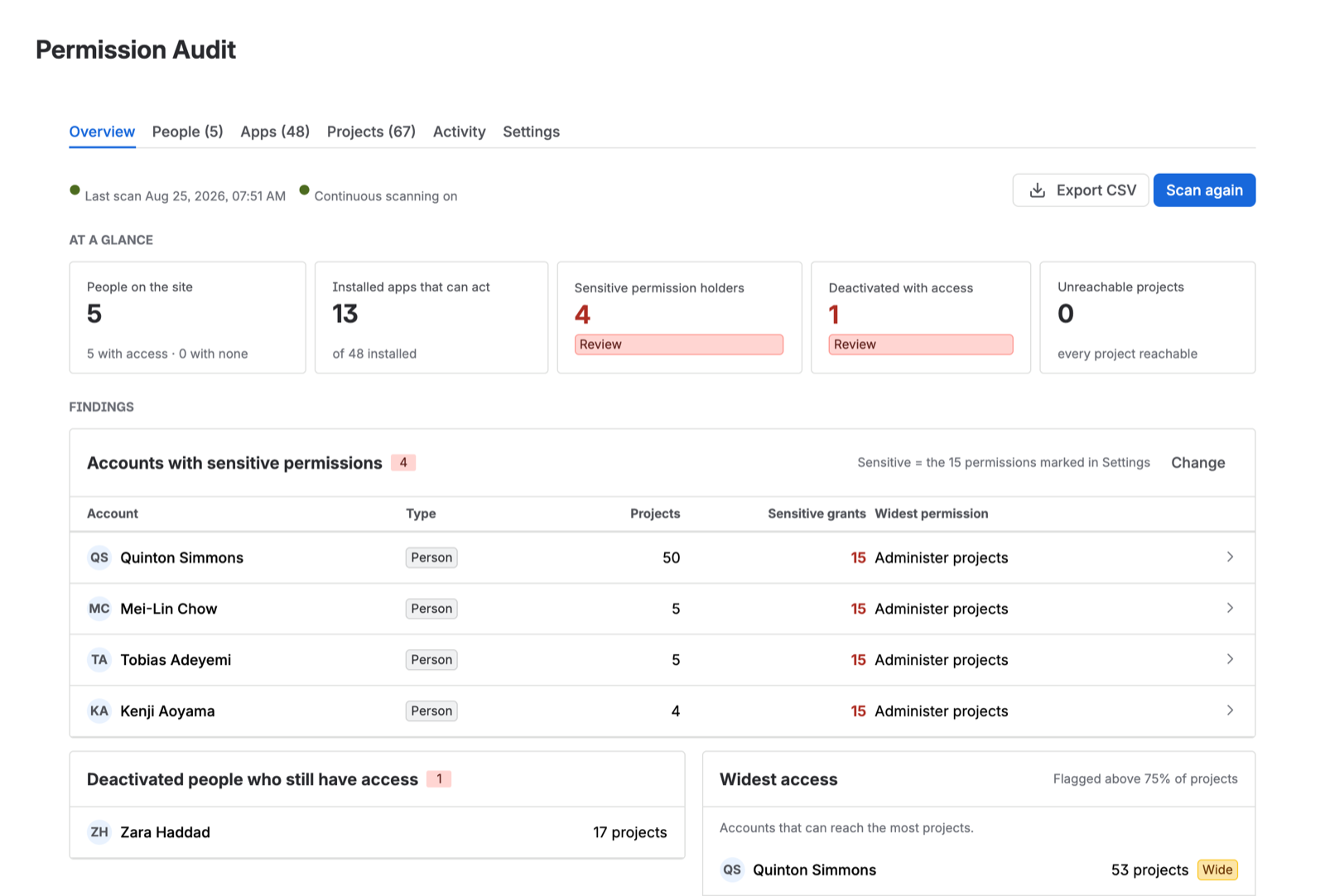
The scan enumerates the whole user directory — active, deactivated, and app principals — rather than working backwards from grants. An account with zero access is reported as zero access, which is how you confirm an offboarding actually worked.
People and apps, reported separately
Installed apps that can act on your site get their own population, their own review, and their own findings. Most access reviews never look at them.
Findings that lead somewhere
Accounts holding sensitive permissions, deactivated people who still have access, projects no account can reach, and the accounts with the widest reach across the estate.
Honest coverage reporting
If a permission scheme, project role, or group could not be read, the report says so and names what was missed. A silently partial answer is worse than no answer, and this is the one thing a compliance tool must never get wrong.
Continuous scanning and permission history
One toggle keeps the report current and records what changed. Ask what an account held on a given date, and see the grants and revocations between two points in time.
CSV export
The full report, with the derivation column, exported for the evidence pack. Choose the columns; the export streams in pages so it works on estates with hundreds of projects.
Incremental scans
After the first pass, a scan reads only what changed. A day on which nothing moved costs a fraction of a full run — which is what makes daily scanning viable on a large site.
Company-managed and team-managed
Both project styles resolve through the same scheme, role, and group machinery, and both are covered.
Security
Built so a security team can say yes.
This app reads your complete access-control map. That is exactly the data you should be most reluctant to send anywhere. So it does not go anywhere.
No servers, because there are none
Permission Audit is a pure Forge app. All of it — the scan, the resolver, the storage — runs on infrastructure Atlassian operates, inside your site’s own boundary. QuinTek operates no backend that could receive your data.
Zero external egress
The app makes no outbound calls to any third party. There is no analytics SDK, no error reporting service, and no telemetry pipeline reaching out of Atlassian.
Runs on Atlassian
Eligible for Atlassian’s Runs on Atlassian programme, which is granted on architecture rather than paperwork: it is only available to apps that store and process data entirely within Atlassian’s infrastructure.
Derived results, isolated per install
Scan results persist in Forge SQL, Atlassian’s managed database, walled off per installation by construction. It stores the resolved report — not a copy of your configuration.
No API tokens, ever
The app never asks anyone to paste an admin API token. Atlassian’s Marketplace Security Enforcement Policy prohibits that pattern, and any app that asks you for one should be declined on the spot.
It will tell you about itself
Apps with admin-level scopes are placed into an admin group at install and quietly hold Administer Jira as a result — including this one. That is precisely the invisible privilege an access review exists to surface, so the report surfaces it.
The full picture for every QuinTek app is on the security page.
Editions
Two editions
Sold through Atlassian, billed with the rest of your Marketplace apps. Atlassian’s standard 30-day trial applies, and sites with 10 users or fewer are free under Atlassian’s own pricing rule.
Standard
A recurring manual access review.
Pricing at launch
- One manual scan per rolling week
- Full people report with the derivation chain
- Findings: sensitive permissions, deactivated accounts with access, widest access
- Coverage reporting
- CSV export of the current people report
- Installed-app review
- Continuous scanning
- Permission history
Advanced
A permission record that stays current on its own.
Pricing at launch
- Everything in Standard
- Unlimited scans
- Continuous scanning, on by default
- Permission history — what an account held on a given date
- Change detection between any two scans
- Installed-app review as a separate population
- CSV export of people and apps
Questions
Before you install it
- Does my permission data leave Atlassian?
- No. Permission Audit is a pure Forge app with no external egress — the scan, the resolution, and the stored report all run inside Atlassian’s infrastructure. QuinTek operates no server that could receive it.
- Who can use it?
- Jira site administrators. The app opens from Jira Settings and requires Administer Jira, which is also what guarantees the scan can see every project’s configuration.
- Does it support Confluence?
- Not yet. Confluence has a different permission model and a different API, and doing it properly is a comparable amount of work to building the Jira product. It is deliberately deferred rather than half-done.
- Will it work on Jira Free?
- Permission schemes and project roles do not exist on the Jira Free plan, so there is very little for the app to resolve. It is built for Standard, Premium, and Enterprise sites.
- Does it change anything in my Jira?
- No. Permission Audit is read-only with respect to your configuration. It reports; it never grants, revokes, or edits a scheme, role, or group.
- How large an estate can it handle?
- It is built and tested against estates in the hundreds of projects. Scans run server-side in chunks so you can close the tab, and after the first pass they run incrementally.
Permission Audit is nearly here
It is in final release preparation for the Atlassian Marketplace. Ask us to tell you when it lands, and we will.
Permission Audit is in final release preparation. Ask to hear when it ships.
Or read the documentation first — it is public, and complete, before you install anything.