
Using the report
How access is derived
The chain from account to permission, why every route matters, and how to read the derivation rail.
This page describes the thing the product exists to show. If you read one page of these docs, read this one.
The chain
In Jira, nobody is granted a project permission directly in the usual case. Access resolves through a chain:
account
  └── is a member of a group
        └── which is an actor in a project role
              └── which the project's permission scheme grants a permission to
Every link is separately editable by a different person for a different reason, and changing any one of them changes who has access — usually without anyone noticing, because no screen in Jira shows the whole chain at once.
Not every grant runs the full length. A permission scheme can grant directly to a group, or to an individual account, or to a role, or to a class of people such as “whoever is assigned the issue” or “anyone with a Jira licence”. Permission Audit resolves whichever route applies and labels it for what it is.
The derivation rail
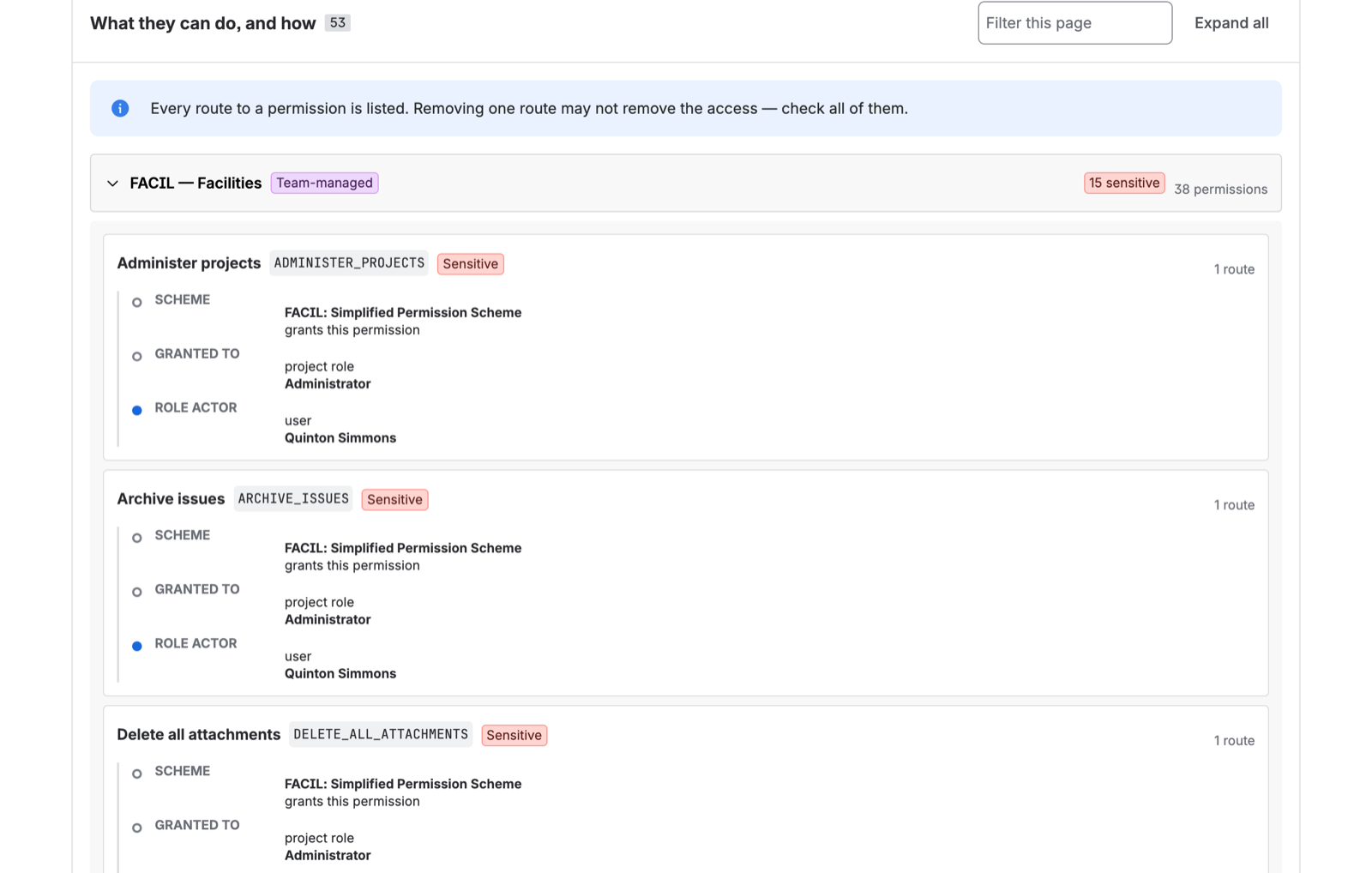
Open any account from the People tab. For each project it can reach, each permission it holds is shown with the route that produced it, as a labelled vertical rail:
- Scheme — the permission scheme that grants it, and the project it applies to
- Granted to — what the grant was actually made to: a role, a group, an account, or a class
- Actor — how this specific account satisfies that
Every route, not the first one
When an account reaches the same permission by more than one route, all of them are shown.
This matters more than it sounds. The failure mode it prevents is the most common way an access
review produces a wrong result: an administrator sees that Priya has Administer Projects via
engineering-leads, removes her from that group, and records the access as revoked — while she
still holds it through release-managers, which is an actor in the same role.
A tool that shows one route lets you make that mistake confidently. Showing all of them is the difference between “revoke this person’s admin” and knowing which specific memberships to change to actually accomplish it.
Access that has no individual to attribute
Some grants are not made to anyone in particular:
- “Anyone with a Jira licence” — an application-access grant covering every licensed user
- “Whoever is assigned the issue” or “whoever reported it” — grants that depend on issue state rather than on identity
- “Anyone on the site” or public access, where a project is configured that way
These are real access and they appear in the report, but they cannot be resolved to a list of named accounts, because membership depends on data the permission model does not hold. Project detail groups them by holder rather than listing them per person — see Projects.
Renaming a group is not a permission change
Worth knowing if you use the history feature: the report keys a grant on the triple of project, permission, and account — not on the text of its derivation.
So renaming a group rewrites the derivation text without changing anyone’s access, and the history log does not report a phantom grant-and-revoke pair when that happens. The route is an attribute of the grant, not its identity.
What is not resolved
Issue security schemes. Issue-level restriction is a separate mechanism layered on top of project permissions. An account that this report shows as able to browse a project may still be unable to see specific issues within it because of an issue security level. That is out of scope for v1 and the report does not claim otherwise.
Nested groups. Atlassian Cloud does not support them. If your identity provider models nesting, it flattens the groups before they reach Atlassian, so what the scan sees — and what actually governs access — is the flat list.