
Running it
Scan cost and quota
What a scan actually consumes, why incremental scanning matters, and where to see the cost of a run.
Scanning an estate means reading its configuration through Jira’s REST API. That consumes your site’s API budget, and on a large estate it is worth understanding what drives the cost before turning on daily scanning.
What a scan reads
A full pass reads, once each:
- every project on the site
- every project’s permission scheme and project role configuration
- every distinct permission scheme
- every group referenced by any grant, and its membership
- the user directory
The dominant cost is usually group membership, not project count. A site with 500 projects sharing six permission schemes is a much cheaper scan than a site with 80 projects and hundreds of large, distinct groups — because the schemes are read once each and the group memberships are not.
Incremental scanning is the reason this is viable
After the first complete pass, a scan reads what changed rather than re-reading everything. A run on which nothing moved costs a small fraction of a full pass.
This is what makes continuous scanning practical. Without it, keeping a large estate current would mean a complete re-read of every scheme, role, and group on every run — which is 365 full passes a year, and a genuinely different proposition for your API budget.
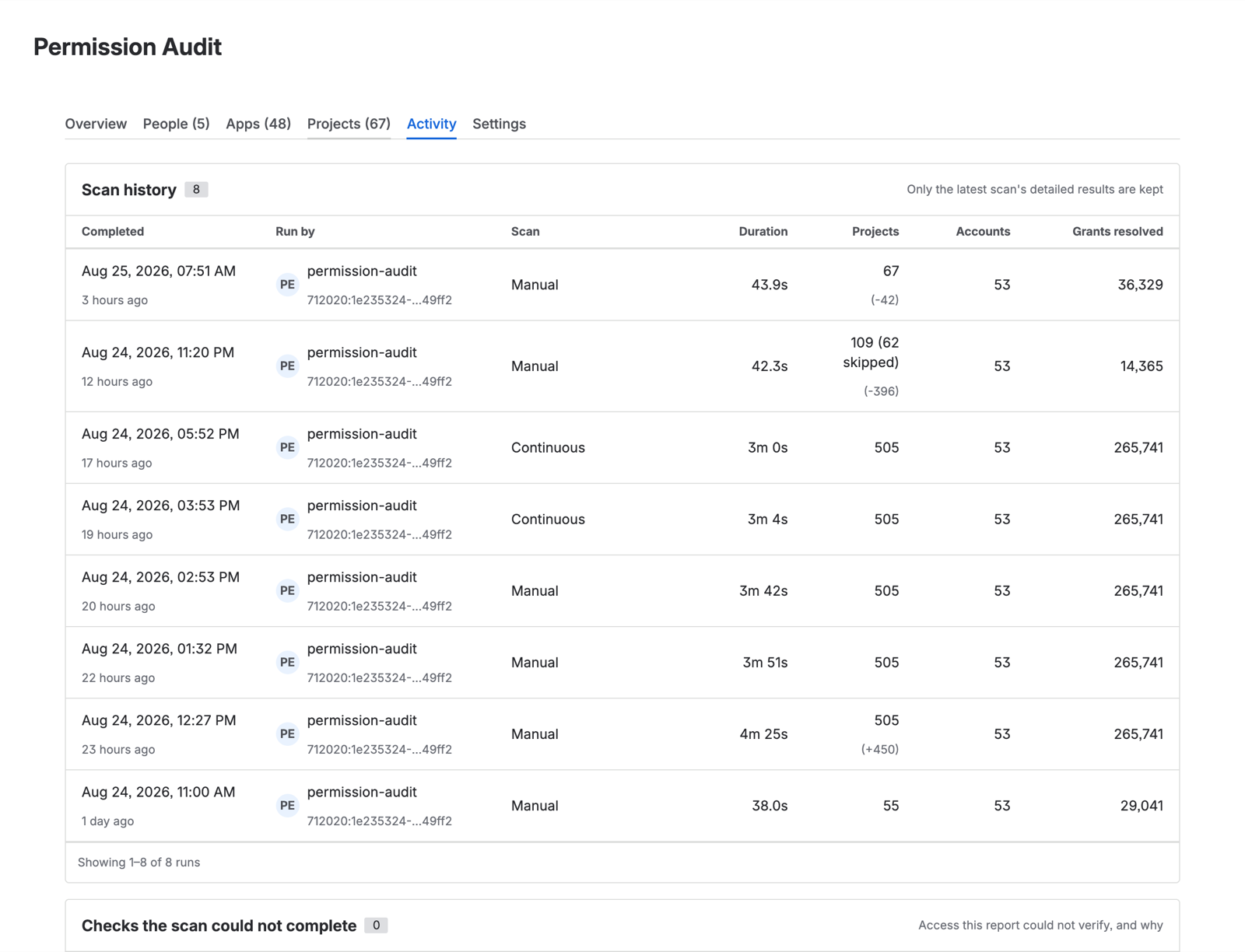
A run occasionally falls back to a full pass when the incremental baseline can no longer be trusted. When that happens the Activity log says so and names the reason, so an unexpectedly long run is explained rather than mysterious.
Where to see what a run cost
The Activity run log records each scan’s duration, what it covered, what it skipped, and its mode — full, continuous, or manual.
Read it after your first few runs. It is the only figure that reflects your estate, and it is a better basis for deciding on scan frequency than any general guidance, including this page.
Practical guidance
Run the first scan when the site is quiet. It is the one scan that has to read everything.
Leave continuous scanning on if you are on Advanced. Incremental runs are cheap, and a stale permission report that still looks authoritative is the failure mode worth avoiding.
If you see rate-limiting, it will appear as partial coverage with the affected items named in Activity, not as a silently short report. Rescan; a subsequent incremental run has far less to read.
Storage
Scan results and history are stored inside Atlassian’s managed database, isolated per installation. The current report is overwritten each scan rather than accumulated. History grows with the number of changes recorded, not with the size of the estate, so a stable site accumulates very little.