
Using the report
Permission history
Asking what an account held on a given date, and seeing what changed between two scans.
The current report answers “who has access now”. History answers the two questions an auditor asks next: what did this account hold on that date, and what changed between these two points.
What gets recorded
Every completed scan is recorded with the exact instant it finished, along with the changes since the previous scan — each grant that appeared, disappeared, or changed route.
It is a change log, not a series of snapshots. A scan on which nothing changed records the run and nothing else, which is what makes keeping history over a long period affordable.
Asking what someone held on a date
Pick a date and the report reconstructs the state as of that date by replaying the recorded changes.
The date picker defaults to yesterday, and today is not selectable. That is deliberate: the current tabs already answer today, and offering “today” in a historical view invites you to compare a partially-elapsed day against complete ones.
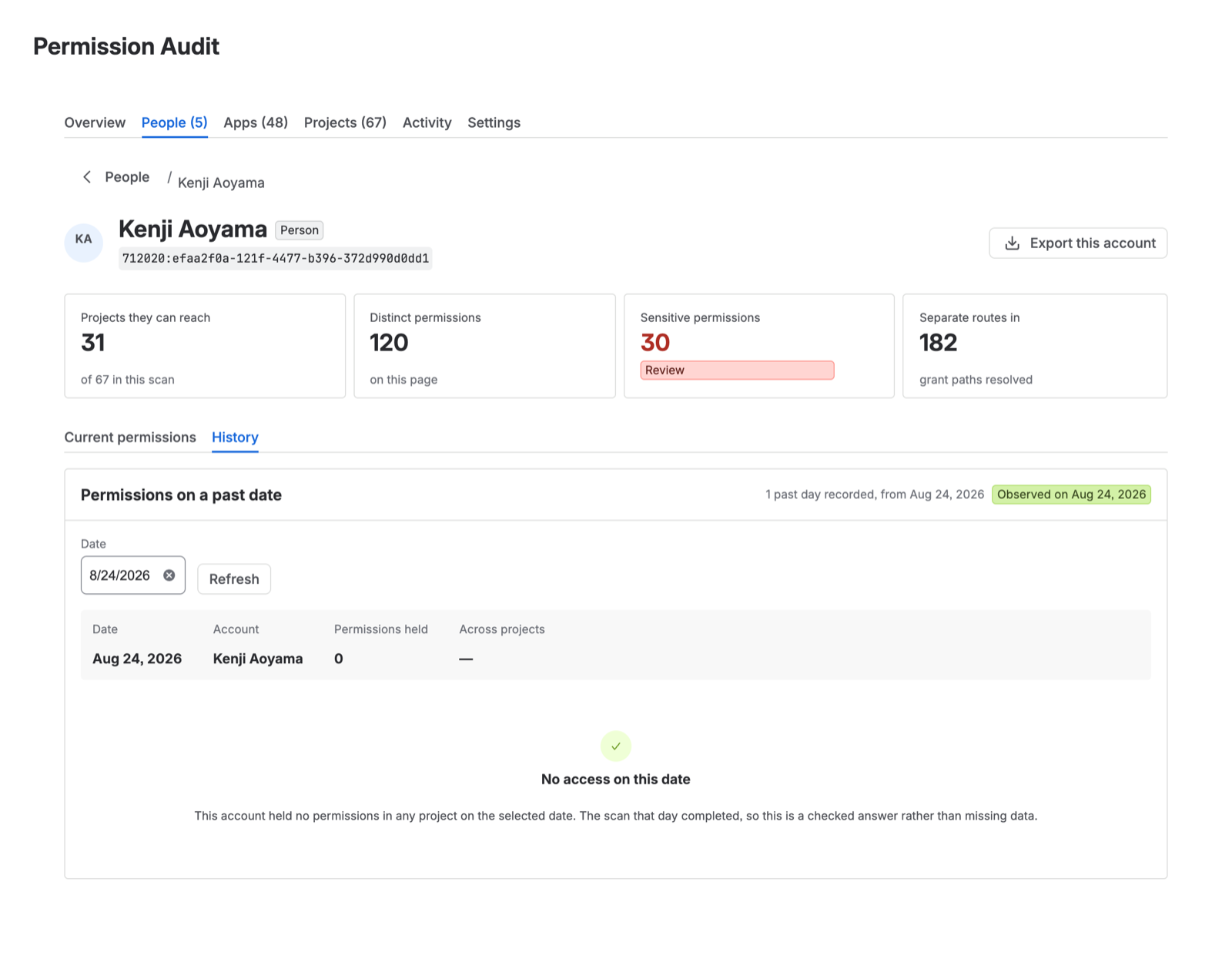
“Held nothing” and “nobody looked” are different answers
This is the distinction history exists to preserve.
If no scan completed on a given date, that date has no record, and the report says so. It does not interpolate from the days either side and it does not report an absence of recorded grants as an absence of access. Inferring a gap would be the same silent-partial-answer failure that the coverage line exists to prevent, one level up.
You will see this if continuous scanning was off for a period, or if a scan failed and did not complete. Activity shows which dates have a completed scan behind them.
Comparing two points
Choose two scans and the report shows what changed between them: grants added, grants removed, and the accounts affected.
Renaming a group does not appear as a change. A grant is keyed on the project, the permission, and the account — the derivation route is an attribute of it, not its identity. So a rename rewrites the route text without producing a phantom revoke-and-regrant pair. Only actual changes to who holds what are reported.
Turning history off
Turning continuous scanning off stops new history being recorded. Existing history is kept.
Deleting an audit trail as a side effect of flipping a toggle would be a hostile default, so the app does not. If you turn continuous scanning back on later, recording resumes and the earlier record is still there — with an honest gap for the period when nothing was scanned.
On a downgrade from Advanced to Standard, recorded history is likewise kept rather than deleted; it simply is not viewable until the site is on Advanced again.
What history costs
Storage, which grows with the number of changes rather than with the size of the estate, and the API usage of the scans that produce it. See Scan cost and quota.