
Getting started
What Permission Audit does
The question the app answers, who it is for, and what is in scope for the first release.
Permission Audit answers one question about your Jira Cloud site:
Who can access this project, and how did they get that access?
The second half is the part nothing native reports. Jira can tell you that an account holds
Administer Projects on a project. It cannot tell you that the account holds it because it is a
member of engineering-leads, which is an actor in the Administrators project role, which the
project’s permission scheme grants that permission to.
That chain — account → group → project role → permission scheme grant — is what determines effective access, and reconstructing it by hand is what makes a quarterly access review take a week.
What it produces
A report covering every account on your site, with, for each one:
- every project it can reach, and every permission it holds there
- the derivation for each grant — the route that produced it, in full
- every route, when there is more than one, because removing one and assuming access is gone is how access reviews produce false confidence
Plus a set of findings that are usually the reason someone opened the app: accounts holding sensitive permissions, deactivated people who still have access, projects no account can reach, and the accounts with the widest reach across the estate.
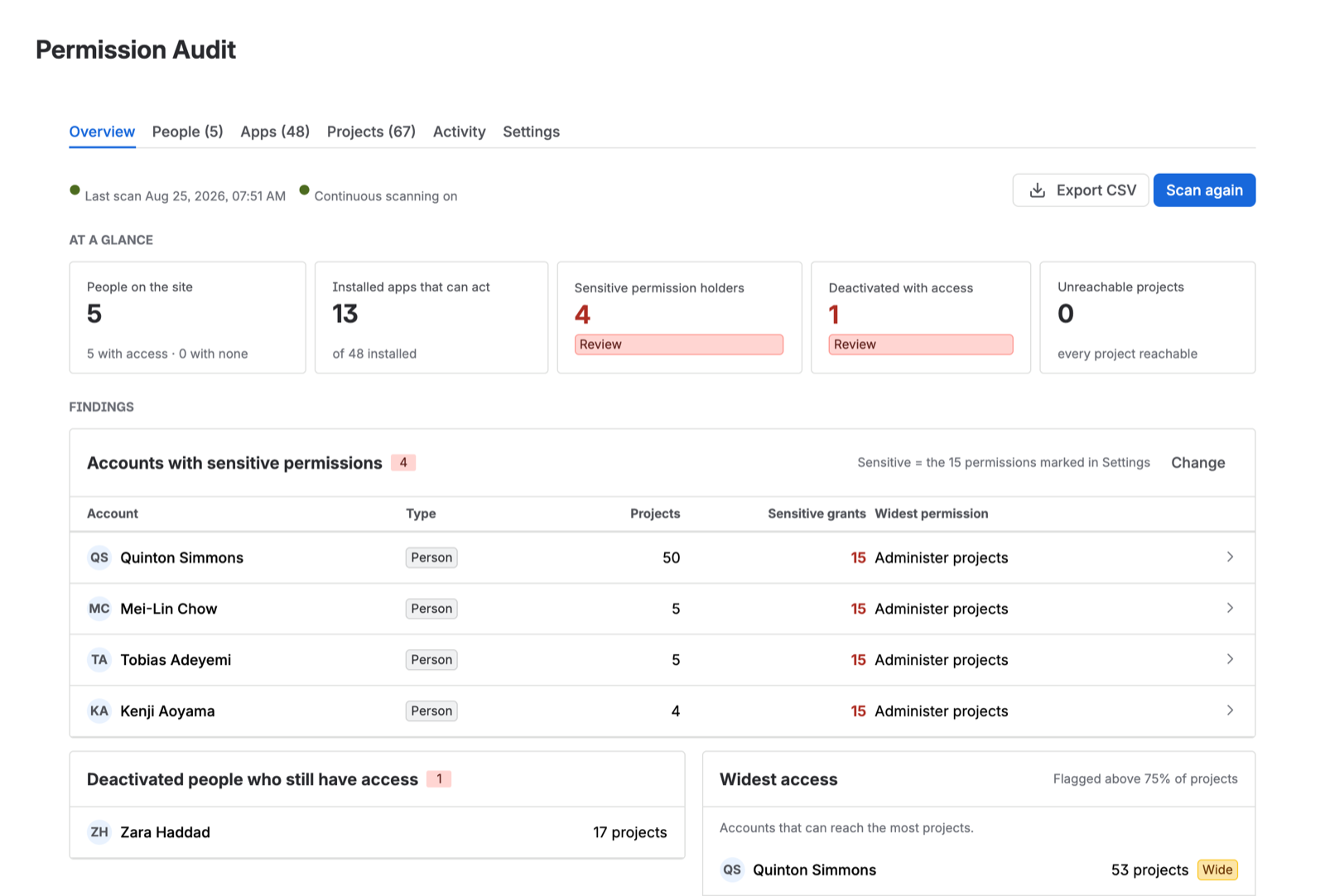
Accounts with no access are reported too
This is a design decision worth stating plainly, because it is what separates the report from a permission export.
The scan enumerates your user directory and reports on every account in it — active, deactivated, and app principals — rather than working backwards from the grants it finds. An account that holds nothing appears in the report holding nothing.
That is not padding. It is the answer an offboarding check actually needs, and a grant-driven export cannot produce it by construction: it only ever learns about accounts that show up in a grant. If you want to confirm that someone’s access was removed, “not in the export” and “confirmed to hold nothing” are very different statements, and only one of them is evidence.
Installed apps are reviewed as well
Every Forge and Connect app on your site acts under a principal that holds real product permissions. Most sites have dozens. Most access reviews have never looked at one of them.
Permission Audit reports them as a separate population with their own findings. See Installed apps.
Who it is for
Jira site administrators. The app opens from Jira Settings and requires the Administer Jira global permission — which is also what guarantees the scan can read every project’s configuration rather than a filtered subset of it.
What is in scope for v1
In scope
- Jira Cloud, all project styles — company-managed and team-managed alike
- Project permissions resolved through permission schemes, project roles, and groups
- People, deactivated accounts, and app principals
- Coverage reporting: what was read, and what could not be
- CSV export
- Continuous scanning and permission history (Advanced edition)
Not in scope
- Confluence. A different permission model and a different API — deliberately deferred rather than half-built.
- Issue security schemes. Issue-level restriction is a separate mechanism from project permissions and is not resolved.
- Making changes. The app is read-only with respect to your configuration. It reports; it never grants, revokes, or edits anything.
Where your data goes
Nowhere. Permission Audit is a pure Forge app: the scan, the resolution, and the stored report all run inside Atlassian’s infrastructure, and QuinTek operates no server that could receive your data. See Security and data handling.